Upgrading within Gradle 9.x.y
This chapter provides the information you need to migrate your Gradle 9.x.y builds to the latest. For migrating to Gradle 9.0.0, see the older migration guide first.
We recommend the following steps for all users:
-
Try running
gradle help --scanand view the deprecations view of the generated Build Scan.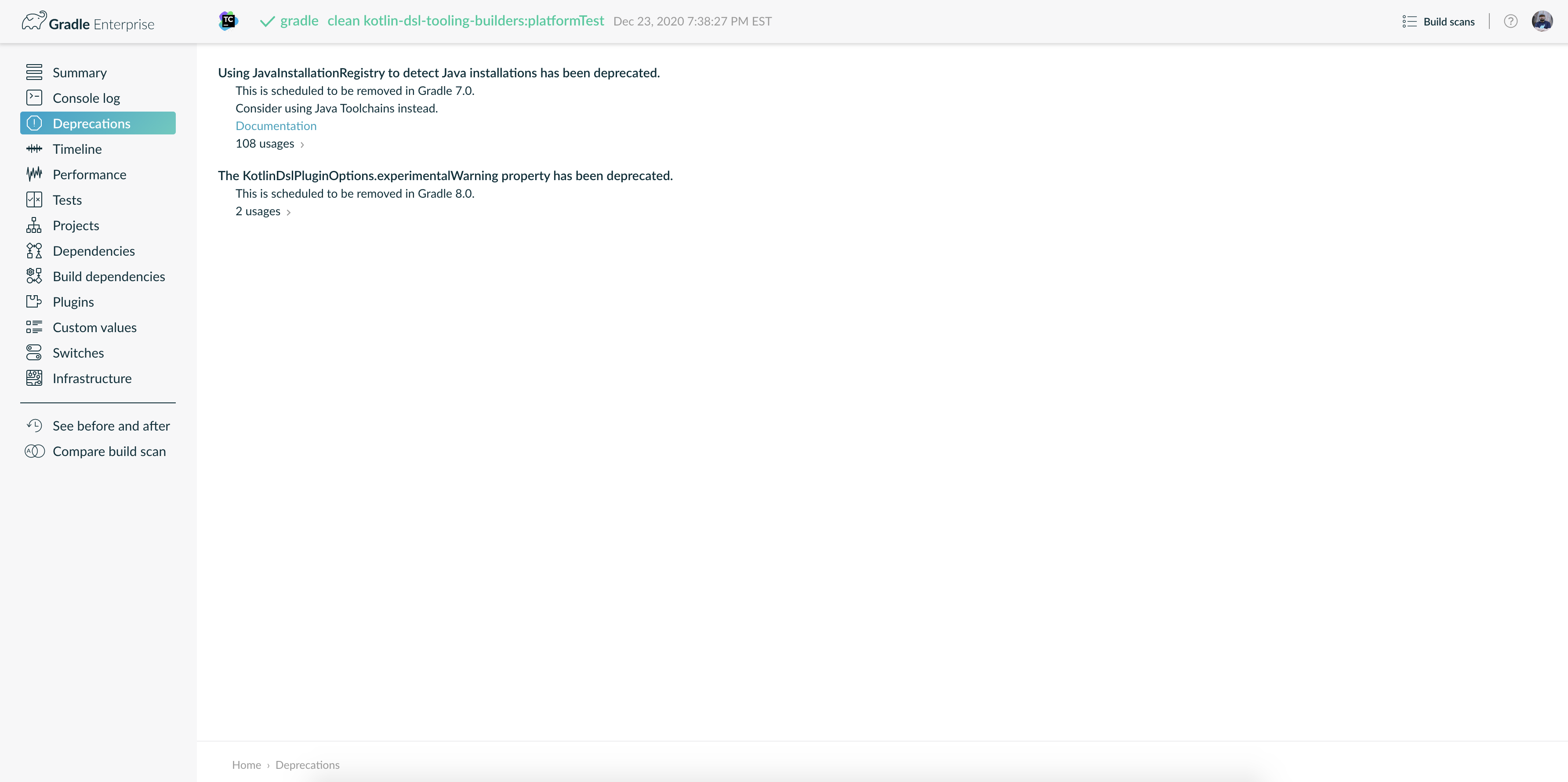
This lets you see any deprecation warnings that apply to your build.
Alternatively, you can run
gradle help --warning-mode=allto see the deprecations in the console, though it may not report as much detailed information. -
Update your plugins.
Some plugins will break with this new version of Gradle because they use internal APIs that have been removed or changed. The previous step will help you identify potential problems by issuing deprecation warnings when a plugin tries to use a deprecated part of the API.
-
Run
gradle :wrapper --gradle-version 9.8.1to update the project to 9.8.1. -
Try to run the project and debug any errors using the Troubleshooting Guide.
Upgrading from 9.7.0 and earlier
Potential breaking changes
Upgrade to Kotlin 2.4.10
The embedded Kotlin has been upgraded from 2.4.0 to Kotlin 2.4.10.
Upgrade to ASM 9.10.1
ASM was upgraded from 9.9 to 9.10.1 to support Java 27.
Upgrade to JaCoCo 0.8.15
JaCoCo has been updated to 0.8.15.
This changes the default toolVersion used by the JaCoCo plugin.
If you need to pin the previous version, set jacoco.toolVersion = "0.8.14" in your build.
Upgrade to Groovy 4.0.33
Groovy has been updated to 4.0.33.
Task logging listeners are now stored in the Configuration Cache
Standard output and error listeners registered on a task’s logging manager during configuration (for example via LoggingOutput.addStandardOutputListener or LoggingOutput.addStandardErrorListener) are now stored in the Configuration Cache and re-registered on a cache hit, so they receive the task’s output as they would without the Configuration Cache.
Previously, these listeners were silently discarded and never received output when the Configuration Cache was used.
A listener that cannot be serialized is now reported as a Configuration Cache problem instead of being silently dropped, which may cause a build that previously worked to fail. If your build registers such a listener and the listener is nonessential, you can opt out, restoring the previous behavior where listeners are dropped on a cache hit, and no problem is reported by setting:
org.gradle.configuration-cache.unsafe.skip-task-logging-listeners-serialization=trueThis property is a temporary opt-out and will be removed in a future Gradle release.
Kotlin object singletons keep their identity in the Configuration Cache
If your build stored mutable state on a Kotlin object, that state is no longer restored on a cache hit; move it elsewhere.
A Kotlin object (including companion object declarations) stored in the Configuration Cache is now restored as the same singleton instance.
As a consequence, only the singleton’s identity is restored, not any mutable state it may hold.
Previously, each object was serialized as a regular bean and rebuilt as a new instance on a cache hit, so deserialized === TheObject was false.
If you relied on mutable state surviving a cache hit, move it into a task property or another bean type that is serialized by value.
Invalid toolchain installation paths now warn instead of failing the build
Unresolvable or relative paths in org.gradle.java.installations.paths and org.gradle.java.installations.fromEnv are now reported as warnings through the Problems API instead of failing the build with UnsupportedOperationException: Cannot convert relative path … to an absolute file..
These properties are optional configuration. A valid toolchain may exist through another discovery mechanism, so an unresolvable entry should not prevent the build from running.
Common cases that previously failed and now warn:
-
Cross-platform builds where a Unix-style absolute path such as
/opt/jdk-24is treated as relative on Windows. -
Relative paths committed to
gradle.propertiesin version control.
Correct the offending entries to remove the warning.
Builds that relied on the previous failure to surface misconfiguration should validate these properties by other means — for example, by running with --warning-mode all or inspecting the Problems report.
See Custom Toolchain Locations in the Gradle User Manual for details.
Copy and Sync destination is now a lazy destinationDirectory property
Copy and Sync now expose the destination as an incubating DirectoryProperty destinationDirectory.
For standard Copy and Sync tasks, into(…), setDestinationDir(File), getDestinationDir(), and destinationDirectory all configure or expose the same destination.
During Gradle 9.x, both destinationDir and destinationDirectory are registered as task outputs for binary compatibility.
The new destinationDirectory output is optional, allowing task types compiled against an earlier Gradle version that override getDestinationDir() to continue supplying the destination through the legacy output.
In Gradle 10, destinationDirectory will become the sole registered output.
Task types overriding the legacy accessors require special care during this transition:
-
An overridden
getDestinationDir()takes precedence when the task executes, even ifdestinationDirectoryis configured separately. -
An overridden
setDestinationDir(File)is not invoked when the destination is configured throughdestinationDirectory.
Either override can cause the legacy and lazy destinations to get out of sync, so task authors should migrate away from overriding these methods.
Deprecations
Deprecation of implicit opt-in to parallel model building
Parallel model building lets Tooling API clients (most commonly IDEs during project synchronization) build project models in parallel.
Historically, it had no dedicated control and was enabled implicitly whenever parallel execution (org.gradle.parallel=true or --parallel) was enabled.
Gradle 9.4.0 introduced the dedicated org.gradle.tooling.parallel property to control parallel model building explicitly.
When that property is not set, its value is currently derived from org.gradle.parallel to preserve backward compatibility.
Relying on this implicit behavior is now deprecated.
When org.gradle.parallel is enabled and org.gradle.tooling.parallel is not set explicitly during model building, Gradle emits a deprecation warning.
In Gradle 10, the two properties will become independent, and enabling org.gradle.parallel without an explicit value for org.gradle.tooling.parallel during model building will be an error.
To avoid the warning and prepare for Gradle 10, set org.gradle.tooling.parallel explicitly to either true or false, for example in gradle.properties:
org.gradle.tooling.parallel=trueAdditionally, the transitional system property org.gradle.tooling.parallel.ignore-legacy-default (used by some IDEs during sync to opt out of the legacy default) will no longer be honored in Gradle 10.
Once org.gradle.parallel and org.gradle.tooling.parallel are independent, the flag is redundant, so Gradle 10 simply ignores it.
No action is required in Gradle 9.x; if you set it explicitly, you can remove it when upgrading to Gradle 10.
Deprecation of starting external processes at configuration time with ExecOperations and Java/Groovy standard APIs
Starting an external process at configuration time with ExecOperations or the Java and Groovy standard APIs directly is now deprecated.
This includes:
-
ExecOperations.execandExecOperations.javaexec. -
java.lang.ProcessBuilder.start()andProcessBuilder.startPipeline(…). -
java.lang.Runtime.exec(…)(all overloads). -
The Groovy process helpers
String.execute(…),String[].execute(…), andList.execute(…).
This does not affect uses of the ProviderFactory.exec / ProviderFactory.javaexec providers (providers.exec / providers.javaexec) or a ValueSource that runs a process inside, those remain the supported way to run a process at configuration time.
Starting an external process at configuration time in any of the deprecated ways is already an error when the Configuration Cache is enabled. Because the Configuration Cache will be enabled by default in Gradle 10, Gradle now deprecates unsupported behaviors even when the Configuration Cache is not currently enabled.
Migrate to one of the following, in order of preference:
-
Move the process execution into a task, so it runs at execution time and benefits from build caching, up-to-date checks, and work avoidance. Use an
ExecorJavaExectask, or a custom task that injectsExecOperationsand runs the process in its task action. -
For simple cases, use
providers.exec/providers.javaexec. Prefer wiring the returned provider lazily to task inputs, and callget()only as a last resort. -
For more complex output processing, use a
ValueSourcethat injectsExecOperations(or usesjava.lang.ProcessBuilderdirectly). The same guidance about wiring the provider lazily to task inputs applies.
This behavior will become an error in Gradle 11.
Deprecation of enabling the Build Cache from build logic
Enabling the Build Cache from build logic by mutating the start parameter, for example gradle.startParameter.buildCacheEnabled = true in a settings.gradle(.kts) file or init script, is now deprecated and will be removed in Gradle 10.
Whether the Build Cache is enabled is determined by the Gradle invocation (--build-cache / --no-build-cache) and the org.gradle.caching Gradle property, and is not intended to be overridden by build logic.
Enable or disable the Build Cache with the org.gradle.caching Gradle property instead.
See Enable the Build Cache for details.
Deprecation of implicit task dependencies between builds
Gradle now detects overlapping task outputs across the builds of a composite build. Tasks in different builds that write to the same location no longer run in parallel, matching the behavior of tasks within a single build.
As part of this change, a task consuming the outputs of a task in another build without declaring an explicit or implicit dependency is now deprecated. This will become an error in Gradle 10, matching the existing behavior for tasks in the same build.
See Implicit dependencies between tasks for details and possible solutions.
Deprecation of creating and copying StartParameter
Starting in Gradle 10, constructing new instances of StartParameter will no longer be permitted.
It was never intended to be instantiated or copied by build logic, but the public no-argument constructor and the newInstance() / newBuild() methods made that possible.
The following have been deprecated for removal:
-
the public
StartParameter()constructor
The existing StartParameter instance for a build may be obtained via Gradle.getStartParameter() instead of constructing or copying one.
Deprecation of Signature as a Configuration artifact
Starting in Gradle 10, Signature will no longer implement PublishArtifact.
The following methods inherited from PublishArtifact have been deprecated and will be removed in Gradle 10:
-
getName()/setName(String) -
getExtension()/setExtension(String) -
getType()/setType(String) -
getClassifier()/setClassifier(String) -
getDate()/setDate(Date) -
getBuildDependencies() -
builtBy(Object…)
Furthermore, Signature will no longer extend the internal AbstractPublishArtifact class or implement the internal PublishArtifactInternal interface.
Code that dereferenced these internal types via Signature must be updated.
The shouldBePublished() method inherited from PublishArtifactInternal has also been deprecated for removal.
As a result, a Signature will no longer be permitted directly as an artifact of a Configuration.
Starting in Gradle 10, the Signing Plugin will no longer create the signatures configuration or automatically add Signature instances to it.
The getConfiguration() and setConfiguration(Configuration) methods on SigningExtension have been deprecated and will be removed in Gradle 10.
Creating a configuration named signatures before the signing plugin is applied is now also deprecated.
Deprecation of constructing Signature instances
Starting in Gradle 10, manually constructing a Signature instance will no longer be permitted.
All public constructors for this type have been deprecated for removal.
To sign files, use the sign methods on the Sign task, or use the sign methods on SignOperation.
Deprecation of getSignatures() and getSingleSignature() on SignOperation
The getSignatures() and getSingleSignature() methods on SignOperation have been deprecated and will be removed in Gradle 10.
Use getFilesToSign() and getSignatureFiles() instead.
Deprecation of signing files with a classifier
The following methods that accept a classifier alongside files to sign have been deprecated and will be removed in Gradle 10:
-
Sign.sign(String, File…) -
SignOperation.sign(String, File…) -
SigningExtension.sign(String, File…)
The classifier argument is ignored during signing and does not influence the resulting signature file.
Use the sign(File…) overloads instead.
Deprecation of unsupported attribute value types
Attribute value types are limited to: String, Boolean, any subtype of Number, and any type that implements org.gradle.api.Named.
Passing any other type to Attribute.of(String, Class) — or declaring an unsupported type as the type parameter of an AttributeCompatibilityRule or AttributeDisambiguationRule — now emits a deprecation warning and will become an error in Gradle 10.
The most common case is a plain Java Enum that does not implement Named.
Such types often work at first but fail later during dependency resolution, publishing, or configuration cache serialization — where the machinery assumes an attribute value can be reconstructed by name.
To fix a build affected by this deprecation, change the attribute value type to one of the supported types.
For enums, the simplest fix is to make the enum implement Named and return the constant’s name from getName().
See the variant attributes documentation for the full set of supported attribute value types.
Deprecation of using KotlinNativeBundleArtifactsTypes as an attribute value type
The Kotlin Gradle Plugin (KGP) 2.0.x line registers an attribute of type org.jetbrains.kotlin.gradle.targets.native.toolchain.KotlinNativeBundleArtifactFormat.KotlinNativeBundleArtifactsTypes — a plain Java Enum that does not implement org.gradle.api.Named.
This deprecation is a specialized variant of the general unsupported attribute value type deprecation, called out separately so users can identify KGP as the source and remediate by upgrading the plugin.
To fix builds affected by this deprecation, upgrade the Kotlin Gradle Plugin to 2.1.0 or later. KGP 2.1.0 and newer do not use a plain enum for this attribute and are unaffected.
Like the general case, this deprecation will become an error in Gradle 10.
See the variant attributes documentation for the full set of supported attribute value types.
Deprecation of macOS on AMD64
macOS AMD64 (Intel) is deprecated as a supported platform and will be removed from the supported platforms in Gradle 10.
macOS 27 runs on Apple Silicon only, and the OpenJDK macOS/x64 port is deprecated for removal, so JDK 27 and newer are not available for the platform.
Gradle is therefore no longer tested on macOS AMD64 with Java 27 or newer.
To prepare for Gradle 10, move your builds to macOS AArch64 (Apple Silicon).
Upgrading from 9.6.0 and earlier
Potential breaking changes
Resilient sync reports failed operations
Tooling API clients that query models through the incubating BuildController.fetch(…) method perform a resilient sync: failures are attached to each FetchModelResult instead of aborting the operation.
Previously, such an operation could complete successfully even when some of these model builds failed.
The failures were reported only through FetchModelResult.getFailures(), and the client still received a successful result.
Starting in Gradle 9.7.0, the operation is reported as failed when any part of it fails: ResultHandler.onFailure(…) is called, and a blocking run() throws, even though the partial models have already been delivered.
Because a single BuildAction loses its result in that case, clients should use a phased build action and read the partial models from the intermediate result handlers.
This aligns resilient sync with the reporting of getModel(…) and findModel(…), and of task and configuration failures, so a sync in which something failed is no longer reported as successful.
Checksum files are no longer published for signature files
When publishing to Maven or Ivy repositories, Gradle no longer publishes checksum files (such as .sha1 and .md5) for signature files like .asc and .sig.
A signature is itself an integrity artifact, so a checksum of a signature provides no additional protection, and the standard Maven publishing tooling does not publish these files either. The signature files themselves continue to be published unchanged; only their checksum files are no longer produced.
The project cache directory is no longer watched
Gradle no longer watches the project cache directory (the .gradle directory in the root project, or a custom location set with --project-cache-dir).
Because Gradle is the only writer to this directory, it keeps the virtual file system up to date directly, without relying on OS file system events.
As a result, a custom project cache directory no longer disables file system watching.
Previously, --project-cache-dir (or org.gradle.projectcachedir) was incompatible with watching: passing --watch-fs alongside it failed the build, and leaving watching at its default silently disabled it.
File system watching now follows the usual rules regardless of where the project cache directory is located.
This applies to the project cache directory itself. Source-dependency check-outs, which live under the project cache directory but whose contents can change externally, remain watched as regular build directories.
See Excluding files and directories for details.
Upgrade to Kotlin 2.4.0
The embedded Kotlin has been upgraded from 2.3.21 to Kotlin 2.4.0.
Starting with Kotlin 2.4.0, the compiler no longer supports -language-version=1.9, which means the K1 compiler is gone entirely.
2.0 is the new minimum compile target (and is itself deprecated, pointing at 2.2).
From the 2.4.0 release notes:
-
KGP requires a minimum Gradle version of
7.6.3, fully tested through9.5.0. -
Support for Java
26has been added.
Oldest supported kotlin-dsl plugin version is now 6.2.0, which can be used to build precompiled-script plugins targeting a language level as old as 1.8. Oldest supported KGP version is 1.9.22 which can be used to write Kotlin plugins targeting language levels as old as 1.4 and be used in Gradle versions as old as 7.2.
Kotlin DSL scripts can no longer reference relocated internal dependencies
Kotlin DSL build scripts (.gradle.kts) are now compiled against a prebuilt public API JAR from the Gradle distribution instead of the dynamically generated Gradle API JAR.
As a result, build scripts that import classes from org.gradle.internal.impldep.* (Gradle’s relocated internal dependencies) will no longer compile.
These classes were never part of Gradle’s public API.
If your build scripts reference org.gradle.internal.impldep.* types, replace them with the original library coordinates added as dependencies to your build logic:
// Before (will no longer compile):
// import org.gradle.internal.impldep.com.google.gson.Gson

// After: add the dependency to buildscript or buildSrc
buildscript {
    dependencies {
        classpath("com.google.gson:gson:2.11.0")
    }
}
// Then import directly:
// import com.google.gson.Gson
This change does not affect plugin projects that have gradleApi() or gradleKotlinDsl() among their dependencies. Those continue to use the full generated Gradle API JAR as before.
|
Behavior and contract changes for *Parameters.None
The marker types used to declare a parameterless action — WorkParameters.None, TransformParameters.None, BuildServiceParameters.None, ValueSourceParameters.None, FlowParameters.None and JvmTestToolchainParameters.None — have been standardized.
-
The configuration
Actionis now invoked even when the action declaresNoneas its parameters type. Calls likeWorkQueue.submit(MyAction.class, p → …),FlowActionSpec.parameters { … },ValueSourceSpec.parameters { … },BuildServiceSpec.parameters { … }andTransformSpec.parameters { … }now always run the configuration block. When the parameters type isNone, the block receives theNonesingleton instead of being skipped. Existing blocks that just configured properties on a real parameters type are unaffected; any code that relied on the block being silently skipped forNonewill now run. -
getParameters()returns theNonesingleton instead ofnullfor parameterless actions. Inside aWorkAction,TransformAction,BuildService,ValueSourceorFlowActionthat declaresNoneas its parameters type,getParameters()now returns theNonesingleton. Previously it could returnnull. Null-checks against the result are no longer required.
No source change is needed in typical builds.
If you have custom code that branched on getParameters() == null to detect a parameterless action, replace it with getParameters() instanceof WorkParameters.None (or the equivalent None type).
Feature previews
Opt into improved dependency resolution ordering
A new feature preview, ENHANCED_GRAPH_ORDERING, is available to opt into new dependency resolution ordering behavior that will become the default in Gradle 10.
With this feature preview enabled, Gradle will use a standard breadth-first ordering when using the DEFAULT sort order.
Gradle may optionally be configured to return artifacts sorted topologically, using the CONSUMER_FIRST sort option, which sorts artifacts earlier than those they depend on.
As usual, the DEPENDENCY_FIRST ordering is the reverse of the CONSUMER_FIRST ordering.
Notably, unlike the existing sorting methods, all sorting options in Gradle 10 will ignore constraint edges when traversing the resolved graph.
You can enable this feature preview in your settings.gradle.kts:
// settings.gradle.kts
enableFeaturePreview("ENHANCED_GRAPH_ORDERING")
Deprecations
Deprecation of the software model
The Gradle software model — including the model { } DSL, RuleSource plugins, and the native and JVM component types built on top of them — is deprecated and will be removed in Gradle 10.
This affects the following groups of public API types:
-
The rule-authoring API in
org.gradle.model:RuleSource,ModelMap,ModelSet,ModelElement, and the@Model,@Mutate,@Defaults,@Finalize,@Validate,@Each,@Path,@RuleInput,@RuleTarget,@Rules,@Managed, and@Unmanagedannotations. -
The component-model base API in
org.gradle.platform.baseandorg.gradle.language.base:ComponentSpec,BinarySpec,LibrarySpec,ApplicationSpec,LanguageSourceSet, and related container, builder, and annotation types. -
The native component plugins:
c,cpp,objective-c,objective-cpp,assembler,windows-resources, andnative-component, along with their source-set, binary-spec, build-type, flavor, and prebuilt-library types inorg.gradle.nativeplatformandorg.gradle.language.*. -
The native test plugins
cunit,cunit-test-suite,google-test, andgoogle-test-test-suite, along with the rule-basedtest-suite-baseinfrastructure inorg.gradle.testing.base. -
The
model,componentReport, anddependentComponentsdiagnostic tasks.
Replace software-model-based builds with the current component model:
-
For C and C++, use the
cpp-applicationandcpp-libraryplugins. -
For Swift, use the
swift-applicationandswift-libraryplugins. -
For native testing, use the
cpp-unit-testandxctestplugins.
The new plugins configure components through ordinary Gradle extensions (application { }, library { }, unitTest { }) without the model { } block, integrate with the configuration cache, and support Gradle’s standard dependency-management features.
Deprecation of org.gradle.unsafe.isolated-projects* property names
The Isolated Projects feature can now be enabled with stable property names that drop the .unsafe. segment, alongside a new incubating CLI option --isolated-projects / --no-isolated-projects:
| Legacy name | New name |
|---|---|
|
|
|
|
|
|
The legacy org.gradle.unsafe.* names are now deprecated and will be removed in a future release.
They continue to be accepted as aliases for now and currently emit no warning.
Update your gradle.properties and command-line invocations to the new names.
When both the legacy and the new name of a property are set — for example, the new name in gradle.properties and the legacy name injected by a plugin or CI script on the command line — an explicit false from either one disables the feature.
This guarantees that tooling which still opts out via a legacy property name keeps working after a build migrates to the new names.
See the Enabling Isolated Projects section in the Gradle User Manual for the recommended setup.
Deprecation of serializing custom collection and map types with the configuration cache
The configuration cache serializes a fixed set of standard collection, set, map, and queue types (such as ArrayList, LinkedHashSet, LinkedHashMap, and ArrayDeque) directly.
A custom subtype of one of these types — for example, class MyList extends ArrayList<String> {} — cannot be restored as its own type and is instead restored as the nearest standard type, losing any state or behavior the custom type adds.
Referencing such a custom subtype from a task field or task action is now deprecated and will become an error in Gradle 10.
To fix it, use a standard collection or map type instead of a custom subtype, and store any extra data in separate fields.
See Custom Collection and Map Types for details.
Upgrading from 9.5.0 and earlier
Potential breaking changes
Plugins relying on removed Problems API internals are no longer compatible with Gradle 9.6
Several internal classes of the Problems API, such as org.gradle.api.problems.internal.InternalProblems, have been removed in Gradle 9.6.
Plugins that bound to these internal classes directly fail at build time with an error mentioning the removed type.
The most common case is Android Gradle Plugin (AGP) 8.x, which relied on these internal classes. To resolve this, upgrade to AGP 9.x, which only uses the public Gradle API and fully supports Gradle 9.6. If the failure comes from another plugin, update it to a version that no longer uses Gradle internal APIs, or stay on Gradle 9.5 until such a version is available.
Concurrency primitives can no longer be serialized by the Configuration Cache
Configuration Cache serialization now reports a clear problem when attempting to serialize most of Java’s standard concurrency primitives.
This includes classes and interfaces from the java.util.concurrent and java.util.concurrent.locks packages, such as ReentrantLock, CountDownLatch, and SynchronousQueue.
Because the Configuration Cache enforces isolation between tasks, these primitives cannot be used correctly for cross-task synchronization.
Allowing serialization would silently give each task its own independent instance (for example, its own lock), so cross-task coordination would never actually occur — that is the bug this error prevents.
Previously, attempts to serialize these types could fail with exceptions such as java.lang.reflect.InaccessibleObjectException, without clearly indicating the underlying issue.
If your build requires shared, synchronized state, use shared build services, which are explicitly designed for safe coordination between tasks.
For a complete list of types that are incompatible with the Configuration Cache, see the documentation.
Upgrade to Kotlin 2.3.21
The embedded Kotlin has been upgraded from 2.3.20 to Kotlin 2.3.21.
Upgrade to PMD 7.24.0
The default version of PMD has been updated from 7.13.0 to 7.24.0.
Upgrade to CodeNarc 3.7.0
The default version of CodeNarc has been updated from 3.6.0 to 3.7.0.
Deprecations
Deprecation of implicit lookup of properties and methods in parent projects
In Gradle’s Groovy and Kotlin DSLs, when a child project’s build script references a property or method that isn’t defined locally, the resolution mechanism walks up the parent projects looking for a match:
ext.foo = "hello"println(foo) // Resolved through hierarchy — now deprecatedextra["foo"] = "hello"val foo: String? by project
println(foo) // Resolved through hierarchy — now deprecatedThis implicit inheritance is deprecated and will be removed in Gradle 10.
Implicit hierarchy lookup creates hidden coupling between projects, makes builds harder to reason about (a typo silently resolves to an ancestor’s definition instead of failing), and is fundamentally incompatible with Isolated Projects.
Here is a full list of affected APIs and DSL constructs:
-
Dynamic references such as a bare
fooorbar()in Groovy DSL -
Kotlin DSL property delegates such as
val foo: String by project -
Explicit API calls on the
Projectinstance or in a build script:-
findProperty("foo") -
property("foo") -
hasProperty("foo") -
getProperties()
-
To migrate, choose the approach that best fits your use case:
-
Build-wide configuration values — declare them in
gradle.propertiesat the root, and read them in subprojects viaproviders.gradleProperty("name"). They become typedProvider<String>values and are available everywhere without any walking. -
Plugin defaults / shared logic — extract into a convention plugin applied to each subproject. Each subproject gets its own configuration; nothing crosses project boundaries.
-
Explicit reference to an ancestor’s value — write
rootProject.ext.foo(orparent.ext.foo) in the child build script. This is a transitional fix: it preserves the cross-project coupling and is therefore not Isolated Projects compatible, but it removes the deprecation warning and makes the dependency explicit.
If you need to keep the original walking semantics, the following helper can be added to a build script or convention plugin:
tailrec fun Project.findExtraInHierarchy(name: String): Any? {
    if (extra.has(name)) return extra[name]
    val ancestor = parent ?: return null
    return ancestor.findExtraInHierarchy(name)
}def findExtraInHierarchy(Project project, String name) {
if (project == null) return null
if (project.ext.has(name)) return project.ext.get(name)
return findExtraInHierarchy(project.parent, name)
}Opt into Gradle 10 behavior by disabling implicit lookup in parent projects
Once you have addressed all related deprecations, you can use a feature preview to adopt the Gradle 10 behavior early. This prevents new accidental implicit lookups from parent projects.
// settings.gradle.kts
enableFeaturePreview("NO_IMPLICIT_LOOKUP_IN_PARENT_PROJECTS")
This will affect the behavior of APIs and DSL constructs mentioned above.
It will also affect the output of the properties task when invoked for subprojects.
Deprecation of Develocity plugin versions before 4.0
Earlier versions of the Develocity plugin rely on the implicit property lookup in parent projects, which is deprecated and will be removed in Gradle 10.
Upgrade to the latest Develocity plugin from the Gradle Plugin Portal. See the Develocity plugin compatibility matrix for details.
Deprecation of getProperties()
The following usages of getProperties() have been deprecated and will be removed in Gradle 10:
-
Project.getProperties()— callinggetProperties()or accessing thepropertiesproperty on aProjectinstance. -
Calling
getProperties()(or accessing thepropertiesproperty) on a build script, settings script, or init script. This is a separate API on the script base class, but has the same problems.
This method, which historically existed for convenience, makes build logic harder to understand and navigate due to the untyped nature of the properties and the fact that they are sourced from many different locations and containers. Using this method also hurts performance of builds by eagerly resolving properties from the environment, reducing the potential for more frequent Configuration Cache hits. The hierarchical look-up of properties through the parent projects chain creates implicit coupling of the mutable state between projects. This impedes the potential of scalability in the future model, where projects are isolated from each other.
To access project properties, prefer providers.gradleProperty("name") which returns a type-safe Provider and is compatible with lazy configuration.
Note that providers.gradleProperty() resolves properties at the build level — it does not include properties from gradle.properties files in subproject directories, nor extra properties or other properties set dynamically on individual projects.
If you need to access extra properties, use ext properties directly.
The following table shows common migration scenarios for project properties:
| Before (deprecated) | After (recommended) |
|---|---|
Accessing a single project property: |
Wire the provider as a task property for better Configuration Cache support: If you need the value immediately: |
Accessing a property with a default value (Kotlin, Java, or Groovy): Accessing a property with a default value (Groovy, idiomatic): |
Use |
Kotlin property delegation: |
Get the project property directly: |
Forwarding properties as system properties: |
Use |
Token replacement in resource files (common in Minecraft mods, Spring Boot, etc.): |
Build an explicit map of only the properties you need: |
Deprecation of Kotlin DSL delegated properties
All Kotlin DSL property delegate extensions have been deprecated and will be removed in Gradle 10. This includes container delegates (by registering, by creating, by existing, by getting), property delegates (by project, by settings, by extra), and value delegates (Property<T> and ConfigurableFileCollection getValue/setValue operators).
Use the explicit API instead.
The container delegates (registering, creating, existing, getting) are defined on NamedDomainObjectContainer and NamedDomainObjectCollection. They apply to any container, not just tasks or configurations.
The examples below use a generic container placeholder; replace it with tasks, configurations, sourceSets, or whichever container you use.
Container delegates:
| Deprecated delegate | Replacement |
|---|---|
|
|
|
|
|
|
|
|
|
|
|
|
|
|
|
|
|
|
|
|
|
|
|
|
|
|
|
|
|
|
|
|
|
|
|
|
When a container holds exactly one element of a given type, you can look it up by type instead of by name. This is useful for plugin-contributed tasks whose names are not part of a public contract:
// Eagerly resolves the single task of type MyTaskType, regardless of its name.
val myTask = rootProject.tasks.withType<MyTaskType>().single()
withType(…).single() is eager. The task must already exist when this line runs.
For lazy configuration, use tasks.withType<MyTaskType>().configureEach { … } instead.
|
Property, extra, and value delegates:
| Deprecated delegate | Replacement |
|---|---|
|
|
|
|
|
|
|
|
|
|
|
|
|
|
|
|
|
|
|
|
|
|
|
|
|
|
|
|
Delegated properties are being removed because they create silent correctness bugs (e.g. no-op delegates, wrong extra property scope), couple entity names to variable names, diverge between build scripts and class-based plugins, and duplicate functionality already provided by explicit APIs or other DSL sugar.
Deprecation of accessing task dependency relationships from a task action
Calling the following methods from a task action at execution time is now deprecated and will become an error in Gradle 10:
These methods can still be used during configuration time.
The deprecation is only issued if the Configuration Cache is not enabled. When the Configuration Cache is enabled, calls to these methods are reported as Configuration Cache problems instead. This is another step towards moving users away from idioms that are incompatible with the Configuration Cache, which will become the only mode supported by Gradle in a future release. For example:
// Deprecated: inspecting dependencies from within the task action
tasks.register("report") {
    dependsOn("compileJava")
    doLast {
        taskDependencies.getDependencies(this).forEach { println(it.name) }
    }
}

// Recommended: capture what you need at configuration time
tasks.register("report") {
    dependsOn("compileJava")
    val dependencyNames = dependsOn.filterIsInstance<Task>().map { it.name }
    doLast {
        dependencyNames.forEach { println(it) }
    }
}
Please refer to the Configuration Cache documentation for alternatives that are compatible with the Configuration Cache.
Deprecation of accessing extensions from a task action
Calling Task.getExtensions() from a task action at execution time is now deprecated and will become an error in Gradle 10.
This method can still be used during configuration time.
The deprecation is only issued if the Configuration Cache is not enabled. When the Configuration Cache is enabled, calls to this method are reported as Configuration Cache problems instead. This is another step towards moving users away from idioms that are incompatible with the Configuration Cache, which will become the only mode supported by Gradle in a future release.
For example:
// Deprecated: reading the extension from within the task action
tasks.register("greet") {
    doLast {
        val ext = extensions.getByType<GreetingExtension>()
        println(ext.message.get())
    }
}

// Recommended: capture the value at configuration time
tasks.register("greet") {
    val message = extensions.getByType<GreetingExtension>().message
    doLast {
        println(message.get())
    }
}
Please refer to the Configuration Cache documentation for alternatives that are compatible with the configuration cache.
Deprecation of accessing injected Project or Gradle services from a task action
Reading an injected service of type Project or Gradle from a task action at execution time is now deprecated and will become an error in Gradle 10.
These services can still be read during configuration time.
The deprecation is only issued if the Configuration Cache is not enabled. When the Configuration Cache is enabled, such accesses are reported as Configuration Cache problems instead. This is another step towards moving users away from idioms that are incompatible with the Configuration Cache, which will become the only mode supported by Gradle in a future release.
For example:
// Deprecated: reading from the injected Project at execution time
abstract class PrintVersionTask : DefaultTask() {
    @get:Inject
    abstract val project: Project

    @TaskAction
    fun run() {
        println("Building ${project.name} version ${project.version}")
    }
}

// Recommended: declare the values you need as task inputs
abstract class PrintVersionTask : DefaultTask() {
    @get:Input
    abstract val projectName: Property<String>

    @get:Input
    abstract val projectVersion: Property<String>

    @TaskAction
    fun run() {
        println("Building ${projectName.get()} version ${projectVersion.get()}")
    }
}

tasks.register<PrintVersionTask>("printVersion") {
    projectName.set(project.name)
    projectVersion.set(project.version.toString())
}
Please refer to the Configuration Cache documentation for alternatives that are compatible with the Configuration Cache.
Deprecation of accessing Task in dependsOn closures
Using the Task argument provided to closures passed to the Task.dependsOn method has been deprecated.
Starting in Gradle 10, closures passed to Task.dependsOn will no longer receive a Task argument.
The following code will not be permitted starting in Gradle 10:
def foo = tasks.register("foo")

// The below usages of dependsOn access the Task object provided as a parameter.
// This is deprecated behavior.
tasks.register("bar") {
    dependsOn { task ->
        task.getName()
        foo
    }
}
tasks.register("baz") {
    dependsOn {
        it.getName()
        foo
    }
}

// Build logic may continue to pass closures to dependsOn without accessing the provided Task.
tasks.register("okay") {
    dependsOn {
        foo
    }
}
Deprecation of undeclared Artifact Transform execution by tasks
Invoking an Artifact Transform from a task that does not declare the resolution as a task input is now deprecated and will become an error in Gradle 10.
With the Configuration Cache, if an Artifact Transform is not properly declared as an input, and requires a producer project that no other scheduled task requires, the producer may not be scheduled and may be unreachable.
This can manifest as project <name> not found errors.
Now, a deprecation is emitted for each task that executes an Artifact Transform that is not declared as an input. This provides an early warning for build scenarios that were only working "by accident".
To fix this warning, declare the resolution triggering the Artifact Transform as a task input.
You can do this by exposing a configurations' files collection through a typed @InputFiles property on a custom task type.
If you must use an ad-hoc task, supply myCustomConfiguration.files to inputs.files(…), or, when consuming an ArtifactCollection, supply ArtifactCollection.getArtifactFiles().
In the common case, both of these methods wire the transform steps into the execution plan so the task is recognized as a declarer of the transform.
Declaring a transformed FileCollection view as a task input:
val view = configurations["implementation"].incoming.artifactView {
    attributes.attribute(color, "green")
}.files

// Deprecated: the doLast reads view.files without declaring view as a task input.
tasks.register("consume") {
    doLast {
        println("result = ${view.files.map { it.name }}")
    }
}

// Recommended: expose the FileCollection through a typed @InputFiles property on a custom task type.
abstract class Consume : DefaultTask() {
    @get:InputFiles
    abstract val colored: ConfigurableFileCollection

    @TaskAction
    fun run() {
        println("result = ${colored.files.map { it.name }}")
    }
}

tasks.register<Consume>("consume") {
    colored.from(view)
}
Declaring a transformed ArtifactCollection view as a task input — note that declaring the raw Configuration (inputs.files(configurations["compile"])) is NOT enough, because it only schedules the source artifacts, not the transforms:
val artifacts = configurations["compile"].incoming.artifactView {
    attributes { attribute(usage, "transformed") }
}.artifacts

// Deprecated: declaring the raw configuration doesn't wire the transform.
tasks.register("show") {
    inputs.files(configurations["compile"])
    doLast {
        println("files: ${artifacts.map { it.file.name }}")
    }
}

// Recommended: declare the transformed artifact view's artifactFiles as the input.
tasks.register("show") {
    inputs.files(artifacts.artifactFiles)
    doLast {
        println("files: ${artifacts.map { it.file.name }}")
    }
}|
How declaration is detected Gradle determines whether a task has declared a transform output as an input by walking the task’s transitive dependency subgraph in the execution plan after the work graph is fully built. Any transform step reachable from the task through dependency edges, without crossing into another task, is considered declared by that task. This covers chained transforms, If you write |
Deprecation of using Project objects as dependency notation
Passing a Project object directly as a dependency notation has been deprecated and will become an error in Gradle 10.
Previously, you could declare a project dependency by passing a Project instance directly:
def someProject = project(":some-project")
dependencies {
    implementation(someProject)  // Deprecated
}
Instead, use the project() method on DependencyHandler or the createProjectDependency() method on DependencyFactory:
dependencies {
    implementation(project(":some-project"))
}
Or, when using the DependencyFactory directly (e.g., from a plugin):
Configuration implementation = project.getConfigurations().getByName("implementation");
ProjectDependency dependency = project.getDependencyFactory().createProjectDependency(":some-project");
implementation.getDependencies().add(dependency);
Deprecation of artifactUrls on Maven repositories
The artifactUrls family of methods on MavenArtifactRepository is deprecated and will be removed in Gradle 10.
This includes:
-
MavenArtifactRepository.getArtifactUrls() -
MavenArtifactRepository.artifactUrls(Object…) -
MavenArtifactRepository.setArtifactUrls(Set) -
MavenArtifactRepository.setArtifactUrls(Iterable)
The same deprecation applies to passing artifactUrls as a key in the map argument to RepositoryHandler.mavenCentral(Map), since that path delegates to the methods above.
These methods let a single Maven repository declaration look for POMs at the base URL while looking for artifacts (such as JARs) at one or more additional URLs. This is a Gradle-specific extension with no equivalent in Maven, and there is no direct replacement.
Deprecation of RepositoryHandler.flatDir(Map) and RepositoryHandler.mavenCentral(Map)
The map-argument overloads RepositoryHandler.flatDir(Map) and RepositoryHandler.mavenCentral(Map) are deprecated and will be removed in Gradle 10.
Use the action-based overloads (flatDir(Action), mavenCentral(Action)) instead — they are typed, work in both the Groovy and Kotlin DSLs, and are the canonical way to configure a repository.
For flatDir:
repositories {
    flatDir {
        name = "libs"
        dirs "libs1", "libs2"
    }
}repositories {
flatDir {
name = "libs"
dirs("libs1", "libs2")
}
}For mavenCentral:
repositories {
    mavenCentral {
        name = "nonDefaultName"
    }
}repositories {
mavenCentral {
name = "nonDefaultName"
}
}Deprecation of buildNeeded and buildDependents tasks
The buildNeeded and buildDependents tasks from the Java plugins are deprecated and will be removed in Gradle 10.
buildNeeded builds the current project along with all projects it depends on.
buildDependents does the opposite: it builds the current project and all projects that depend on it.
These tasks were introduced back in Gradle 0.8.
Their implementation is incompatible with Configure on Demand and Isolated Projects, and the tasks themselves are too rigid to cover the range of use cases users actually need.
Existing Gradle functionality covers these use cases, so rather than rework the tasks, we are removing them.
buildNeeded depends on the current project’s build task and on the buildNeeded task of each project that appears as a direct dependency in the testRuntimeClasspath configuration.
Because those buildNeeded tasks depend on each other, the result is that the entire project dependency closure is built.
Depending on what you were using buildNeeded for, one of the following may replace it:
-
If you only need to build or test a specific project, run that task directly (e.g.,
./gradlew :proj:build) and let Gradle resolve its task dependencies automatically. -
For running tests across all projects the current project depends on, use test report aggregation.
-
For plugin authors and advanced build logic, use Artifact Views to select artifacts from projects in a dependency graph and wire their producer tasks as dependencies.
There is no direct replacement for buildDependents.
For most workflows, running all tasks with a given name (e.g., ./gradlew test) combined with up-to-date checks and build caching will skip work for unaffected projects, at the cost of configuring all projects.
Deprecation of Configuration.getTaskDependencyFromProjectDependency()
The Configuration.getTaskDependencyFromProjectDependency(boolean, String) method has been deprecated and will be removed in Gradle 10.
It exists to support the buildNeeded and buildDependents tasks deprecated above, and has no other intended use.
Its implementation is fundamentally incompatible with Isolated Projects and Configure on Demand.
There is no direct replacement for this method. If you were using it to reach tasks across project boundaries, Artifact Views let you select artifacts from dependent projects and let Gradle wire the producer tasks through normal dependency resolution.
Deprecation of file generation tasks of IDE plugins
The idea and eclipse plugins contribute tasks for generating IDE specific files on disk.
These tasks were originally the primary way to set up a project for an IDE.
However, all modern IDEs now have built-in Gradle integration (IntelliJ IDEA’s Gradle import, Eclipse Buildship, etc.) and can import Gradle projects directly without needing these generated files.
We are deprecating these file generation tasks:
-
idea/ideaProject/ideaModule/ideaWorkspace(generate.ipr,.iml,.iwsfiles) -
eclipse/eclipseProject/eclipseClasspath/eclipseJdt/eclipseWtpComponent/eclipseWtpFacet(generate.project,.classpath,.settings/files) -
openIdea(generates files and opens IDEA) -
associated
clean*tasks
In addition to the tasks, certain model properties that only affect the generated files are also deprecated.
These include idea.module.iml { … }, idea.project.ipr { … }, idea.workspace { … }, idea.targetVersion, idea.pathVariables, idea.module.pathVariables, idea.project.projectLibraries, eclipse.wtp.facet { … }, the file { … } merging hooks on EclipseJdt and eclipse.wtp.component, and the withXml { … } hook on all file { … } blocks.
The beforeMerged { … } and whenMerged { … } hooks on the eclipse project and classpath models are not deprecated, as they also affect the model consumed by the IDE.
The rest of eclipse.wtp { … } is not deprecated: the eclipse.wtp.component { … } configuration feeds the WTP classpath attributes surfaced via the Tooling API, which Eclipse Buildship consumes.
The model properties that affect how IDEs understand your project (source directories, language levels, dependency scopes, etc.) are not deprecated.
When you apply the plugins and configure the idea { … } or eclipse { … } blocks in your build scripts, you can customize how your IDE understands your project.
These customizations are picked up automatically by the Gradle integration built into IDEs.
This functionality will continue to work unchanged.
| Not all the functionality of the plugins is being deprecated, only the tasks and some model properties strictly related to them. |
Deprecation of targetJdk on the PMD plugin
The targetJdk property on Pmd and PmdExtension, along with the TargetJdk enum, are deprecated and will be removed in Gradle 10.
This includes:
-
Pmd.getTargetJdk()/Pmd.setTargetJdk(TargetJdk) -
PmdExtension.getTargetJdk()/PmdExtension.setTargetJdk(TargetJdk)/PmdExtension.setTargetJdk(Object) -
The
TargetJdkenum and itstoVersion(Object)static method -
PmdPlugin.getDefaultTargetJdk(JavaVersion)
These were used by PMD versions older than 5.0 to select the target Java language level via Ant’s targetjdk attribute.
PMD 5.0 and later infer the language version from the configured rule sets, so this property has been a no-op for all supported PMD versions. Gradle does not support PMD versions earlier than PMD 5.1.0.
There is no replacement.
Remove any targetJdk configuration from your build.
Deprecation of ProblemSpec.severity()
Setting problem severity explicitly when creating a new instance is now deprecated.
Severity is instead determined by the reporting method: ProblemReporter.report() produces warnings and ProblemReporter.throwing() produces errors.
Calling .severity() on ProblemSpec is now a no-op and will be removed in Gradle 10.
Upgrading from 9.4.0 and earlier
Potential breaking changes
Upgrade to Kotlin 2.3.20
The embedded Kotlin has been upgraded from 2.3.10 to Kotlin 2.3.20.
Plugins requested by precompiled settings plugins are now validated at compile time
Gradle now validates plugin requests in precompiled settings plugins (*.settings.gradle.kts) during compilation, failing the build if a requested plugin cannot be resolved.
This matches the existing behavior for precompiled script plugins targeting Project.
Previously, if a precompiled settings plugin was never applied, invalid plugin requests in its plugins {} block went undetected until the plugin was used by a consuming build, at which point the build would fail unexpectedly.
plugins {
    id("com.example.invalid.plugin") // now fails at compile time if unresolvable
}
If you have precompiled settings plugins that are declared but not currently applied, check their plugins {} blocks and remove or fix any plugin requests that cannot be resolved from the dependencies available in the build being compiled.
The Windows start script has been reworked to improve usability
The default Windows start script template (used for gradlew.bat and application start scripts) has been reworked to improve usability and consistency with the Unix shell script.
If you use a custom start script template or invoke gradlew.bat from another batch file, review the changes below, as some may affect your build.
The new script includes the following changes:
-
The
OSvariable check has been removed, since Gradle no longer supports non-NT-based versions of Windows. -
endlocalis now called before invoking the application, so environment variable changes made inside the script do not leak into the invoked process. Any environment variables needed by the application must be set before callinggradlew.bat. -
& CALLis now used after invoking the application, which suppresses the "Terminate batch job (Y/N)?" prompt. If your scripts rely on this prompt for flow control, they will need to be updated. -
exit /bhas been replaced with"%COMSPEC%" /c exit, enabling the use of&&and||operators when calling the script from another batch file.
Upgrading the wrapper to the new script may cause a one-time error if done before Gradle 8.14, because cmd.exe re-reads the script after it changes.
To avoid this, first upgrade to Gradle 8.14 or 9.0.0, then upgrade to 9.5.0.
Calling .values() on environment variables or system properties is now tracked as Configuration Cache input
Starting with Gradle 9.5.0, calling .values() on the maps returned from System.getenv() or System.getProperties() now records all environment variables or system properties as Configuration Cache inputs.
This is consistent with how .forEach() calls are already tracked.
As a result, if your build configuration uses System.getenv().values() or System.getProperties().values(), any change to any environment variable or system property will invalidate the Configuration Cache entry, not just the ones your build actually uses.
If you experience unexpected cache invalidations after upgrading, check whether your build or any plugins call .values() on these maps, and consider switching to targeted property lookups instead.
Dependency lockfiles are generated with a platform-independent line ending
In the context of Dependency Locking, lockfiles now use Unix line endings (LF, \n) instead of the system default.
Existing lockfiles using Windows line endings (CRLF, \r\n) can still be read, but newly generated lockfiles will always use LF.
When running a lock update with Gradle 9.5.0 or above, if your lockfiles were previously generated on Windows, all line endings will be updated to LF. This will appear as a large diff in version control even if no dependencies have changed. This is expected and only happens once.
Dependency verification armored key rings now render non-ASCII characters correctly
In the context of Dependency Verification, when a key has metadata that contains non-ASCII characters, it is now properly rendered in the key header.
When running a dependency verification key export with Gradle 9.5.0 or above, if your keyring already contained keys with non-ASCII metadata, the exported armored keyring will be updated to render those characters correctly. This is expected to happen only once.
The outgoingVariants and resolvableConfigurations reports now hide variants without attributes by default
The outgoingVariants and resolvableConfigurations report tasks now only show variants and configurations that have attributes defined, since only these can participate in variant-aware dependency resolution.
Previously, variants and configurations without attributes were included in the default output. They are now hidden unless the --all flag is passed.
When shown (via --all), attributeless entries are marked with (n) in the report to indicate they are not selectable via variant-aware resolution.
If you rely on seeing attributeless variants or configurations in these reports, add --all to your invocation:
./gradlew outgoingVariants --all
./gradlew resolvableConfigurations --all
Deprecations
Deprecation of setting an exit environment variable
CreateStartScripts.getExitEnvironmentVar() and CreateStartScripts.setExitEnvironmentVar(String) have been deprecated and will be removed in Gradle 10.0.0.
As of this release, these methods are no-ops and have no effect, even with custom start script templates. This is a result of the Windows start script template no longer using an exit environment variable.
If you are using a custom start script template that references the exit environment variable, update your template to remove this dependency. There is no replacement API, the exit environment variable concept has been removed entirely.
Upgrading from 9.3.1 and earlier
Potential breaking changes
ProjectBuilder now enforces consistent build-scoped locations
ProjectBuilder allows you to configure a specific project directory for tests.
While project.projectDir and project.rootDir have always respected this setting, project.layout.settingsDirectory previously did not.
This discrepancy could cause file resolution to inadvertently escape the project directory.
Gradle now anchors the settings search directly to the configured project directory.
This ensures that layout.settingsDirectory, projectDir, and rootDir all point to the same consistent location.
Projects created via ProjectBuilder are now better isolated from the host build environment.
If your tests specifically relied on layout.settingsDirectory pointing to an external location, they will need to be adjusted.
Even if you do not use settingsDirectory directly, you may still observe changes in file resolution.
Previously, dependency management files could be "leaked" into the test from the host build environment; this is no longer the case.
For more details see the related issue.
The java-gradle-plugin plugin now adds the gradleApi() dependency to the compileOnlyApi scope
The gradleApi() dependency is now added to the compileOnlyApi scope instead of the api scope.
This prevents the gradleApi() from leaking into the runtime classpath of other dependents of the plugin project.
This might break projects that were implicitly relying on the gradleApi() being on the compilation or runtime classpath.
If this is the case, add a gradleApi() dependency to the appropriate scope to restore the previous behavior.
For most plugin projects, this change should be transparent as:
-
at compilation time, the plugin project will get the
gradleApi() -
the default test source set will also automatically get the
gradleApi()dependency on the compilation and runtime classpaths
If any additional test source set is used (e.g., integration tests), the plugin extension offers the plugins.testSourceSet method to register the source set for automatic management.
If this cannot be done, a regular declaration of the gradleApi() dependency on the test source can be used as well.
Stricter validation for published plugins
For plugin builds that apply any of the com.gradle.plugin-publish, ivy-publish, or maven-publish plugins, Gradle now automatically enables stricter validation of plugin code.
In order not to break your builds, this does not apply to local plugins (in buildSrc or included builds containing build logic).
However, we encourage you to always enable stricter validation:
tasks.validatePlugins {
    enableStricterValidation = true
}
CodeNarc compilation classpath is set by default
The CodeNarc plugin now automatically populates the compilationClasspath of a CodeNarc task with the compile classpath of its associated source set.
CodeNarc offers Enhanced Classpath Rules (like UnusedImport or DuplicateImport) that require the project’s compiled classes and dependencies to be analyzed for full accuracy.
Previously, you had to wire this up manually.
Now, it works out of the box.
This change introduces a task dependency.
The CodeNarc task must now wait for the compile task to finish so it can access the compiled classes.
If you do not use enhanced rules and want to restore parallel execution, you can manually empty the compilationClasspath:
plugins {
    id("groovy")
    id("codenarc")
}

tasks.withType<CodeNarc>().configureEach {
    // Override the default compilation classpath
    compilationClasspath = files()
}
If your build relies on a custom configuration for the compilationClasspath of a CodeNarc task, you will need to continue explicitly setting it to override the new default behavior.
System property priority for Wrapper execution has changed
The priority of system properties passed to the Gradle Wrapper now correctly follows the documented order of precedence.
In previous versions, properties defined in gradle.properties files could unexpectedly override those passed via the command line.
If a property is defined in multiple locations, Gradle now strictly honors the following hierarchy (from highest to lowest):
| Priority | Source | Example |
|---|---|---|
1 (Highest) |
|
|
2 |
|
|
3 (Lowest) |
|
For more details see the related issue.
Upgrade to Kotlin 2.3.0
The embedded Kotlin has been upgraded from 2.2.21 to Kotlin 2.3.0.
Upgrade to Zinc 1.12.0
Zinc has been updated to 1.12.0.
Deprecations
Deprecation of DomainObjectCollection.findAll(Closure)
The findAll(Closure) method on Gradle collections is now deprecated and scheduled for removal in Gradle 10.0.0.
This method relies specifically on Groovy types and eagerly evaluates the contents of the container.
To fix this, use the similar DomainObjectCollection.matching(Spec).
While not a direct replacement for findAll, matching is lazy, it returns a new collection that only filters elements as they are actually needed by the build:
// Deprecated:
def checkTasks = tasks.findAll { it.name.startsWith("check") }

// Recommended:
def checkTasks = tasks.matching { it.name.startsWith("check") }
Deprecation of methods taking Closure on Test tasks
The following APIs are deprecated and will be removed in Gradle 10.0.0:
-
AbstractTestTask.onOutput(Closure)can be replaced withAbstractTestTask.addTestOutputListener(TestOutputListener) -
AbstractTestTask.beforeTest(Closure)can be replaced withAbstractTestTask.addTestListener(TestListener) -
AbstractTestTask.afterTest(Closure)can be replaced withAbstractTestTask.addTestListener(TestListener) -
AbstractTestTask.beforeSuite(Closure)can be replaced withAbstractTestTask.addTestListener(TestListener) -
AbstractTestTask.beforeSuite(Closure)can be replaced withAbstractTestTask.addTestListener(TestListener) -
Test.testFramework(Closure)can be replaced withTest.options(Action)
Deprecation of apply false in precompiled script plugins
The use of apply false within precompiled script plugins is now deprecated and will result in an error in Gradle 10.0.0.
In a precompiled script, the plugins {} block behaves differently than in a standard build script.
Currently, if you write apply false, Gradle applies the plugin anyway.
This creates confusion because the syntax suggests you are merely adding a plugin to the classpath without activating it, which is not what actually happens.
The fix depends on whether you actually want the plugin to be active in your precompiled script:
-
If you want to use the plugin: Remove the
apply falsestatement. -
If you do NOT want to use the plugin: Delete the line entirely.
plugins {
    // Deprecated (and misleading, as it is still applied)
    id("org.gradle.test-retry") apply false
    // The plugin will still be on the classpath,
    // but it will not be applied as part of this precompiled script plugin.

    // Recommended: Either remove 'apply false' to keep using it,
    // or delete the line to stop using it.
    id("org.gradle.test-retry")
}
Deprecation of version in precompiled Settings script plugins
The use of version within precompiled Settings script plugins is now deprecated and will become an error in Gradle 10.0.0.
In precompiled scripts, version has no effect.
The plugin version is already fixed by the script’s own build file; declaring it again inside the script is ignored and causes confusion about which version is actually in use.
To fix this, remove the .version() or version "…" call from the plugins {} block:
plugins {
    // Deprecated:
    id("org.gradle.test-retry") version "x.y.z"
    // Recommended:
    id("org.gradle.test-retry")
}
Deprecation of Dependencies.getProject() method
The getProject() method on Dependencies has been deprecated and will be removed in Gradle 10.0.0.
Dependencies is used to configure dependencies in test suites.
Previously, getProject() was used by Gradle internally to reference the current project.
While never intended for public use, it could be used unintentionally in build scripts.
For example, the following configuration accidentally invokes the deprecated method because project.path resolves against the Dependencies object rather than the top-level Project object:
testing {
    suites {
        val integrationTest by registering(JvmTestSuite::class) {
            dependencies {
                implementation(project(project.path)) // `project.path` accesses `Dependencies.getProject()`
            }
        }
    }
}
The configuration above may now fail to compile with an error in 9.5.0 if -Werror is set.
To depend on the current project, use the project() method without arguments.
This syntax is the idiomatic way to reference the project in both test suites and standard dependencies {} blocks:
testing {
    suites {
        val integrationTest by registering(JvmTestSuite::class) {
            dependencies {
                implementation(project())
            }
        }
    }
}
Upgrading from 9.2.0 and earlier
Potential breaking changes
Referential equality is not guaranteed for Project instances
Instances of Project type representing the same logical Gradle project do not provide any guarantee of being equal by reference (== in Java, === in Kotlin).
However, historically it was possible to observe that such Project instances were exactly the same.
In Gradle 9.3.0, Project instances (for the same logical project) can be different with respect to the referential equality,
even if obtained within the same context, e.g., in the same build script.
This change is necessary to facilitate future performance improvements of Gradle.
The Project.equals() equality behavior remains unchanged.
Avoid referential equality in Kotlin:
// DON'T do this
project.rootProject === project.parent
Avoid referential equality in Groovy:
// DON'T do this
project.rootProject.is(project.parent)
Avoid referential equality in Java:
MyPlugin.java
// DON'T do this
project.getRootProject() == project.getParent();
In general, it is better to check project equality via Project.getPath() or Project.getBuildTreePath() for composite-build support.
The paths are also better suited to be keys in data structures, like maps.
TestNG output may change when using versions before 6.9.13.3
As part of the AbstractTestTask refactoring, Gradle’s integration with TestNG has been updated.
Gradle now relies on a correctly functioning IClassListener to report the hierarchy of test classes and methods.
When using TestNG versions earlier than 6.9.13.3, this can lead to different or degraded output:
-
With older versions, class information may be lost. For example, output that previously looked like:
org.gradle > TestClass > okmay now be reported simply as:ok. -
For TestNG versions from 6.9.10 up to (but not including) 6.9.13.3, the
IClassListenerAPI exists but is broken. This can result in even worse output, such as empty or missing names.
To get correct and stable output, we recommend upgrading to TestNG 6.9.13.3 or newer.
Upgrade to Kotlin 2.2.21
The embedded Kotlin has been upgraded from 2.2.20 to 2.2.21.
Upgrade to ASM 9.9
ASM was upgraded from 9.8 to 9.9 to ensure earlier compatibility for Java 26.
Upgrade to Groovy 4.0.29
Groovy has been updated to 4.0.29.
Upgrade to JaCoCo 0.8.14
JaCoCo has been updated to 0.8.14.
Deprecations
Deprecation of the Wrapper.getAvailableDistributionTypes() method
The method on the Wrapper task has been deprecated and will be removed in Gradle 10.
Use Wrapper.DistributionType.values() to obtain the available distribution types instead.
Deprecation of publishing dependencies on unpublished projects
When publishing a project, Gradle resolves project dependencies to the coordinates of the target project’s publication.
If the target project has no publication, Gradle currently resolves the dependency silently using that project’s group, name, and version.
Starting with Gradle 10, this behavior is deprecated. Gradle will no longer silently ignore the absence of a publication. Publishing a project that depends on another project without a publication will be forbidden and will cause the build to fail. This change prevents publishing broken metadata with dependency coordinates that cannot be resolved.
The example below demonstrates a build that triggers the deprecated behavior:
plugins {
    id("java-library")
    id("maven-publish")
}

group = "com.example"
version = "1.0.0"

dependencies {
    api(project(":other"))
}

publishing {
    publications {
        create<MavenPublication>("maven") {
            from(components["java"])
        }
    }
}plugins {
id("java-library")
}
group = "com.example"
version = "1.0.0"To avoid this deprecation, ensure that all project dependencies of published projects are also published.
In the example above, applying the maven-publish plugin and configuring a publication in the :other project resolves the issue:
plugins {
    id("java-library")
    id("maven-publish")
}

group = "com.example"
version = "1.0.0"

publishing {
    publications {
        create<MavenPublication>("maven") {
            from(components["java"])
        }
    }
}
Deprecation of legacy Usage attribute values
Since Gradle 5.6, the Usage attribute has been split into an additional LibraryElements attribute.
In the JVM ecosystem, Usage indicates whether a variant is intended for compilation or runtime, while LibraryElements specifies the format of the artifact (for example, a JAR file or a classes directory).
To ease migration, Gradle has automatically mapped legacy Usage values to their corresponding Usage and LibraryElements pairs:
Legacy |
Replaced |
Replaced |
|
|
|
|
|
|
|
|
|
|
|
|
|
|
|
Starting with Gradle 10, this automatic mapping will no longer occur when legacy Usage values are added directly to an AttributeContainer in build logic.
To maintain backward compatibility for already published modules, Gradle will continue translating legacy Usage values found in published Gradle Module Metadata.
Deprecation of using module coordinates to depend on the current project
Starting with Gradle 10, declaring a dependency on the current project using module coordinates (group, name, version) will no longer resolve to that project.
Instead, Gradle will attempt to resolve that dependency from a repository.
The example below demonstrates the change in behavior:
group = "com.example"
version = "1.0.0"

val deps = configurations.dependencyScope("deps")
val classpath = configurations.resolvable("classpath") {
    extendsFrom(deps.get())
    attributes.attribute(Category.CATEGORY_ATTRIBUTE, objects.named(Category.LIBRARY))
}

val elements = configurations.consumable("elements") {
    attributes.attribute(Category.CATEGORY_ATTRIBUTE, objects.named(Category.LIBRARY))
}

dependencies {
    // In Gradle 9.x, this dependency resolves to the `elements` configuration.
    // In Gradle 10, this dependency will attempt to resolve from a repository.
    deps("com.example:my-project:1.0.0")
}
To continue depending on the current project, use a project dependency:
dependencies {
    // Declare a dependency on the current project to continue resolving
    // to the current project.
    deps(project)
}
Deprecation of ModuleVersionSelector to ModuleComponentSelector conversion
The conversion of ModuleVersionSelector to ModuleComponentSelector (used in
ResolutionStrategy.force(…),
DependencyResolveDetails.useTarget(Object), and
PluginResolveDetails.useModule(Object)
) has been deprecated and will be removed in Gradle 10.0.0.
Typically, ModuleVersionSelector instances are DependencyContstraint objects.
Note that this deprecation does not apply to ExternalDependency objects, despite them implementing ModuleVersionSelector.
To fix this deprecation, pass one of the supported notations (for example, a String in the group:name:version format).
Upgrading from 9.1.0 and earlier
Potential breaking changes
Upgrade to Kotlin 2.2.20
The embedded Kotlin has been upgraded from 2.2.0 to Kotlin 2.2.20.
Removed incubating ObjectFactory#dependencyCollector() method
The incubating ObjectFactory#dependencyCollector() method has been removed.
You can still create DependencyCollectors within Gradle managed types.
Consumable configurations in bundled plugins are now initialized lazily
Consumable configurations created by bundled Gradle plugins are now initialized only when needed.
Configure actions on these configurations no longer run at configuration time by default.
They only execute if the configuration is published, consumed as a variant, or otherwise realized by build logic.
For example:
plugins {
    id("java-library")
}

configurations.named("apiElements").configure {
    println("Configuring apiElements")
}
With this change, the Configuring apiElements line is no longer printed during configuration time unless apiElements is actually realized.
See Declaring Configurations for more guidance.
ValidatePlugins now has stricter Java version requirements
The ValidatePlugins task must now run on a Java version that is supported by the Gradle daemon.
This change was made because the task depends on several core Gradle services, which may now be compiled to the same bytecode version supported by the daemon.
By default, the task’s convention has been updated:
-
If your project’s toolchain is compatible,
ValidatePluginswill use it. -
Otherwise, it will fall back to the Java version used to run Gradle.
If you explicitly set a toolchain like this:
tasks.withType<ValidatePlugins>().configureEach {
    javaLauncher.set(
        project.javaToolchains.launcherFor {
            languageVersion.set(JavaLanguageVersion.of(17))
        }
    )
}tasks.withType(ValidatePlugins).configureEach {
javaLauncher.set(
project.javaToolchains.launcherFor {
languageVersion.set(JavaLanguageVersion.of(17))
}
)
}If the specified Java version is not compatible with the Gradle daemon, you must update it to a compatible version.
Deprecations
Deprecation of Project.container(…) methods
The Project.container(…) methods are deprecated and will be removed in Gradle 10.
These methods manually create named domain object containers.
Use a managed property to let Gradle instantiate containers automatically.
If a managed property isn’t possible, use ObjectFactory.domainObjectContainer(…) (available since Gradle 5.5).
Unlike Project.container(Class), the ObjectFactory version decorates container elements and makes them extension aware.
Deprecation of ruleSource-based dependency management APIs
The RuleSource-based dependency management APIs have been deprecated and will be removed in Gradle 10.0.0.
Deprecated APIs include:
Use the alternative methods that accept a ComponentMetadataRule class or an Action.
Deprecation of calling registerFeature without applying the Java plugin
Creating a JVM feature with JavaPluginExtension#registerFeature before applying the Java plugin has been deprecated and will become an error in Gradle 10.0.0.
Ensure the Java plugin is applied before invoking registerFeature.
The following bundled plugins apply the Java plugin automatically:
-
java-library -
application -
groovy -
scala -
war
Upgrading from 9.0.0 and earlier
Potential breaking changes
Upgrade to ASM 9.8
ASM was upgraded from 9.7.1 to 9.8 to ensure earlier compatibility for Java 25.
Upgrade to Groovy 4.0.28
Groovy has been updated to Groovy 4.0.28.
Deprecations
Deprecation of multi-string dependency notation
In an effort to simplify and standardize the Gradle API, the multi-string dependency notation used in dependency management has been deprecated and will no longer be permitted in Gradle 10. Gradle will primarily accept dependency declarations in the form of a single string, with each dependency coordinate separated by a colon.
Below are examples of the deprecated multi-string notation:
dependencies {
    implementation(group = "org", name = "foo", version = "1.0")
    implementation(group = "org", name = "foo", version = "1.0", configuration = "conf")
    implementation(group = "org", name = "foo", version = "1.0", classifier = "classifier")
    implementation(group = "org", name = "foo", version = "1.0", ext = "ext")
}

testing.suites.named<JvmTestSuite>("test") {
    dependencies {
        implementation(module(group = "org", name = "foo", version = "1.0"))
    }
}dependencies {
implementation(group: 'org', name: 'foo', version: '1.0')
implementation(group: 'org', name: 'foo', version: '1.0', configuration: 'conf')
implementation(group: 'org', name: 'foo', version: '1.0', classifier: 'classifier')
implementation(group: 'org', name: 'foo', version: '1.0', ext: 'ext')
}
testing.suites.test {
dependencies {
implementation(module(group: 'org', name: 'foo', version: '1.0'))
}
}These declarations should be replaced with the single-string notation:
dependencies {
    implementation("org:foo:1.0")
    implementation("org:foo:1.0") {
        targetConfiguration = "conf"
    }
    implementation("org:foo:1.0:classifier")
    implementation("org:foo:1.0@ext")
}

testing.suites.named<JvmTestSuite>("test") {
    dependencies {
        implementation("org:foo:1.0")
    }
}dependencies {
implementation("org:foo:1.0")
implementation("org:foo:1.0") {
targetConfiguration = "conf"
}
implementation("org:foo:1.0:classifier")
implementation("org:foo:1.0@ext")
}
testing.suites.test {
dependencies {
implementation("org:foo:1.0")
}
}In some cases, a complete single-string notation may not be known up front.
Instead of concatenating the coordinates into a new string, it is possible to use a DependencyFactory to create Dependency instances directly from the individual components:
val group = "org"
val artifactId = "foo"
val version = "1.0"

configurations.dependencyScope("implementation") {
    dependencies.add(project.dependencyFactory.create(group, artifactId, version))
}def group = "org"
def artifactId = "foo"
def version = "1.0"
configurations.dependencyScope("implementation") {
dependencies.add(project.dependencyFactory.create(group, artifactId, version))
}Deprecation of ReportingExtension.file(String)
The file() method on ReportingExtension has been deprecated and will be removed in Gradle 10.0.0.
Instead, use ReportingExtension.getBaseDirectory() with file(String) or dir(String).
Deprecation of ReportingExtension.getApiDocTitle()
The getApiDocTitle() method on ReportingExtension has been deprecated and will be removed in Gradle 10.0.0.
There is no direct replacement for this method.
Deprecation of JavaForkOptions.setAllJvmArgs()
The setAllJvmArgs() method on JavaForkOptions and, by inheritance, on JavaExecSpec has been deprecated and will be removed in Gradle 10.0.0.
Instead, to overwrite existing JVM arguments, use:
-
JavaForkOptions.jvmArgs() -
JavaForkOptions.setJvmArgs() -
Provide a
CommandLineArgumentProviderto add arguments viaJavaForkOptions.getJvmArgumentProviders()
Note that setAllJvmArgs() method on JavaForkOptions cleared all fork options before setting jvmArgs.
The properties cleared included:
-
System properties configured via
JavaForkOptions.systemProperties -
JVM argument providers configured via
JavaForkOptions.jvmArgumentProviders -
Argument providers configured via
JavaExecSpec.argumentProviders -
Memory settings configured via
JavaForkOptions.minHeapSizeandJavaForkOptions.maxHeapSize -
All other JVM arguments configured via
JavaForkOptions.jvmArgs -
The assertion and debug flags configured via
JavaForkOptions.enableAssertionsandJavaForkOptions.debug
If the arguments you provide to setJvmArgs() or jvmArgs() depend on any of the above properties being cleared, you will need to manually clear them.
Consider the following snippets for examples of how to implement this change:
plugins {
    id("java")
}

tasks.register<JavaExec>("myRunTask") {
    jvmArgumentProviders.clear() // Clear existing JVM argument providers
    maxHeapSize = null // Clear max heap size
    jvmArgs = listOf("-Dfoo", "-Dbar") // Set new JVM arguments
}plugins {
id("java")
}
tasks.named('myRunTask', JavaExec) {
jvmArgumentProviders.clear() // Clear existing JVM argument providers
maxHeapSize = null // Clear max heap size
jvmArgs = ["-Dfoo", "-Dbar"] // Set new JVM arguments
}Deprecation of archives configuration
The archives configuration added by the base plugin has been deprecated and will be removed in Gradle 10.0.0.
Adding artifacts to the archives configuration will now result in a deprecation warning.
If you want the artifact to be built when running the assemble task, add the artifact (or the task that produces it) as a dependency on assemble:
val specialJar = tasks.register<Jar>("specialJar") {
    archiveBaseName.set("special")
    from("build/special")
}

tasks.named("assemble") {
    dependsOn(specialJar)
}
Deprecation of the Configuration.visible property
Prior to Gradle 9.0.0, any configuration with isVisible() returning true would implicitly trigger artifact creation when running the assemble task.
This behavior was removed in Gradle 9.0.0, and the Configuration.visible property no longer has any effect.
The property is now deprecated and will be removed in Gradle 11.0.0.
You can safely remove any usage of visible.
If you want the artifacts of a configuration to be built when running the assemble task, add an explicit task dependency on assemble:
val specialJar = tasks.register<Jar>("specialJar") {
    archiveBaseName.set("special")
    from("build/special")
}

configurations {
    consumable("special") {
        outgoing.artifact(specialJar)
    }
}

tasks.named("assemble") {
    dependsOn(specialJar)
}
Deprecation of non-string projectProperties in GradleBuild task
The GradleBuild task now deprecates using non-String values in startParameter.projectProperties.
While the type is declared as Map<String, String>, there was no strict enforcement, allowing non-String values to be set.
This deprecated behavior will be removed in Gradle 10.0.0.
If you are using non-String values in project properties, convert them to String representation:
val myIntProp = 42

tasks.register<GradleBuild>("nestedBuild") {
    startParameter.projectProperties.put("myIntProp", "$myIntProp") // Convert int to String
}def myIntProp = 42
tasks.register('nestedBuild', GradleBuild) {
startParameter.projectProperties.put('myIntProp', "$myIntProp") // Convert int to String
}Deprecation of project properties for toolchain configuration
In previous versions of Gradle, you could configure toolchains using project properties on the command line with the -P flag.
For example, to disable toolchain auto-detection, you could use -Porg.gradle.java.installations.auto-detect=false.
This behavior is deprecated and will be removed in Gradle 10.0.0.
Instead, you should specify these settings as Gradle properties using the -D flag:
-Dorg.gradle.java.installations.auto-detect=false